Stop Alarm Chatter Without Hiding a Real Event
Reduce repeated raise-clear cycles by separating source faults, deadband, on-delay, off-delay, and the evidence required for staging tests.

Alarm chatter – repeated transitions from active to normal and back again – does not automatically call for a wider deadband. The pattern is a symptom. Its source may be the signal, the process, the alarm limit, the operating state, or the way the alarm engine changes state.
The objective is not merely to send fewer notifications. A configuration change must preserve enough time to respond to a real condition while removing transitions that add no useful information.
Alarm chatter is a symptom, not the diagnosis
A chattering alarm repeatedly moves into and out of the alarm state over a short period. A fleeting alarm is short-lived but may not repeat. The event history should distinguish these patterns, yet there is no universal duration or count that fits every signal and platform.
Before changing a setting, inspect a sufficiently long trend, activation and return-to-normal events, the actual values around the setpoint, and the operating state at the time. Repeated crossings can reflect real process oscillation, signal noise, scaling or installation problems, a limit too close to normal operation, or unsuitable alarm-state behavior.
Specialist guidance on reducing alarm chatter places source diagnosis ahead of filtering, deadband, or delay. That sequence matters because a filter or timer can also postpone or conceal a condition that should remain visible.
First decide whether the condition requires action
An alarm should indicate an abnormal condition that requires a response. It should not be the default label for every threshold crossing, color change, device message, or dashboard notification. The ANSI/ISA-18.2 overview includes required operator response in its alarm definition.
For one problem point, document the abnormal condition, the consequence of inaction, the expected action, the response owner, and the time available. If a message has no defined action, it may belong in an event log, informational display, or diagnostic status instead of the process-alarm list.
Keep process alarms separate from data health. The article on sensor data quality covers invalid and suspect records, while the guide to offline sensor detection separates stale values from evidence that a device or channel is active. Acknowledging a notification also does not prove that the abnormal condition has been corrected.
Separate the setpoint, deadband, on-delay, and off-delay
These settings affect different parts of the alarm state. Treating all of them as an “alarm threshold” makes the trade-offs difficult to review.
| Setting | What it changes | Risk to check |
|---|---|---|
| Setpoint | Defines the boundary compared with the process value | A limit too close to normal operation can create repeated crossings |
| Deadband or hysteresis | Separates activation from return-to-normal behavior in implementations that support it | An excessive value can hold the alarm active or obscure recovery |
| On-delay | Requires the condition to persist before activation | A real condition is delayed by the configured time as well |
| Off-delay | Activates immediately but delays the return-to-normal state | The alarm may remain active and become a standing alarm |
Deadband semantics are not universal. The documented Rockwell ALARM_ANALOG behavior and the Schneider Geo SCADA example apply hysteresis to return-to-normal or clearing. Another engine may use different terms or behavior. The team must answer whether deadband affects activation, clearing, or both from the documentation and tests for the platform actually in use.
Choose the mechanism from signal behavior and response time
There is no set of values that can be copied across sensors. The choice should follow evidence in the trend and event log, the required response time, data cadence, and the selected alarm engine’s state behavior.
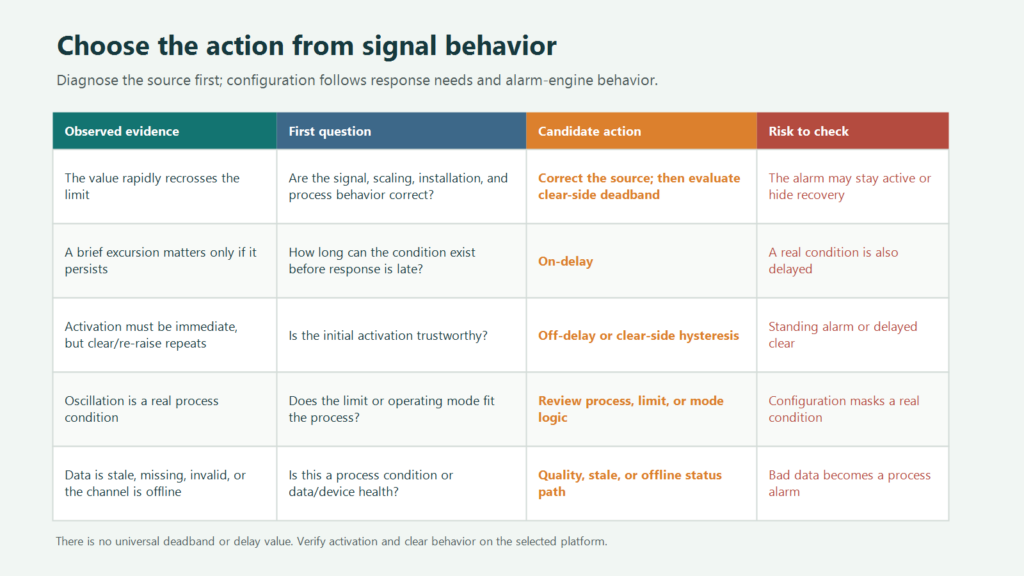
When the value rapidly recrosses a limit inside a range that should not occur, correct the signal or process source first. Clear-side deadband becomes a candidate only when the crossings are legitimate, the initial activation is trustworthy, and the repeated transitions happen while returning to normal.
Evaluate on-delay when a short excursion genuinely requires no action unless it persists. The trade-off must remain explicit: a real event will also wait for the timer. If activation must be immediate but the alarm repeatedly clears and raises again, off-delay or clear-side hysteresis may be considered, with the risk that the alarm remains active for longer.
Do not suppress oscillation that represents a real process condition. Review the process, the limit, or operating-mode logic instead. Stale, missing, invalid, or offline-channel evidence should follow a data-quality or device-health path rather than appearing as an ordinary process alarm.
Document the alarm contract before changing the configuration
Even a change to one alarm point needs a reviewable record. The Rockwell Automation rationalization guide connects alarm validity with consequence, corrective action, response time, priority, limits, and implementation attributes.
A compact contract for one alarm should record at least:
- the point, engineering unit, scaling, and data source;
- the alarm purpose and abnormal condition it represents;
- the consequence of inaction, approved response, owner, and available time;
- the setpoint, activation behavior, any on-delay, and clearing behavior;
- treatment of bad, stale, missing, or offline data;
- priority, recipients, notification route, acknowledgement, and evidence of resolution;
- test scenarios, expected results, and the reviewer who approves the change.
This record keeps a timer change connected to an operational requirement. It also preserves the distinction between receipt, acknowledgement, diagnosis, corrective action, and return to normal.
Test the trend, event log, and notifications on staging
Use a controlled input or an approved data replay. Do not make an unreviewed production change before the test method and its operational impact have been accepted by the system owner.
- Record the baseline, normal variation, operating states, read-send-dashboard cadence, and existing alarm events.
- Exercise values on both sides of the setpoint, including brief excursions, persistent conditions, clearing, and repeated reactivation.
- Compare timestamps in the trend, activation, return-to-normal, event log, and notification record. The guide to data logger intervals explains why sampling, storage, transmission, and dashboard refresh are separate timing decisions.
- Confirm that bad or stale data follows the agreed status path and cannot present itself as a valid process alarm.
- Verify notification delivery separately from acknowledgement and corrective action. A sent message is not evidence that the condition was understood or resolved.
- Repeat the test for relevant operating states and record who received the result and approved the configuration.
The Fortuna Argatech AQMS page verifies a dashboard, threshold-alert management, and WhatsApp notification context. It does not specify a deadband algorithm, delay behavior, acknowledgement workflow, or alarm state machine. Those details must be confirmed against the project’s architecture and staging environment.
Bring one problem alarm to the integration review
Start with one alarm whose pattern and operational meaning can be examined. Bring a trend covering the period before, during, and after the event; the event log; setpoint and unit; operating state; data-quality or offline flags; required response time; and the actual notification and action record.
Fortuna Argatech works with telemetry, remote monitoring, sensor integration, data loggers, dashboards, and alarms. An integration review can map that evidence to the selected platform and project requirements without assuming one deadband or delay for every point. To discuss one problem alarm and a staging test plan, contact the Fortuna Argatech team.
Share this article
Share this insight with your team.
Related Articles
Similar topics from the same category.

8 mandatory monitoring criteria for PROPER Blue rating under PermenLH 7/2025: SPARING, AQMS, B3, waste, peatland, mining, and SIMPEL audit.

Compare TDR and FDR soil moisture sensor principles, dielectric calibration limits for tropical peat, and multi-depth telemetry integration via GEOVOS 1000.

Permen LHK 14/2024 ties SPARING telemetry to daily administrative fines. Understand the formula, sensor risks, and edge validation defense.