Sensor Data Quality Should Be Visible on the Dashboard
Show each sensor reading with its QC status, flag reason, and review rule so suspect, failed, or missing records are not used without context.

Sensor data quality should be visible beside every reading on a dashboard. A value that looks plausible may not have passed quality-control checks, while a reading that crosses an operational alarm threshold does not automatically come from a faulty sensor.
A useful dashboard therefore keeps three pieces of information separate: the measured value, the result of quality-control (QC) tests, and the operational alarm state. That separation helps an operator decide whether a record can proceed, needs review, should be marked as failed, or is genuinely missing.
Sensor data quality is not an alarm state
The measurement answers, “What value was observed?” A quality flag answers, “What did the configured QC tests conclude about this record?” An alarm answers a different question: “Did the reading cross a configured operational limit?”
Those answers can appear in different combinations. A non-alarming value can still be suspect because its timestamp is inconsistent, the signal has stopped changing, or a sudden jump conflicts with surrounding records. An extreme value can also trigger an alarm while representing a real event that deserves investigation rather than immediate deletion.
Fortuna Argatech’s Air Quality Monitoring System page verifies the context of real-time dashboards, threshold management, and notifications. The public page does not document a specific quality-flag scheme. If observation-level quality status is required, its fields, tests, and handling rules must be confirmed during solution design or configuration.
Store a minimum set of actionable states
The QARTOD manual for real-time oceanographic data quality flags offers one primary model that can be interpreted by people and automated processes. It uses five states. This is an ocean-observing convention, not a universal industrial mandate, but it provides a useful reference when a team defines its own internal status model.
| Reference state | Safe interpretation | Follow-up question |
|---|---|---|
| 1 Pass | The record passed the configured critical real-time QC tests and may be treated as preliminary data for an approved use | Which workflows or reports may use this preliminary record? |
| 2 Not evaluated | The record has not been evaluated or its status is unknown | Should downstream use wait until a quality result is available? |
| 3 Suspect | The record requires attention or is of high interest | Which field evidence, neighboring records, or sensor history should be reviewed? |
| 4 Fail | The record failed an applicable test and should be clearly identified as unacceptable quality if it is distributed | Which automated paths must reject or separate it? |
| 9 Missing | No observation is available and the absence is explicitly represented | Does the system show the gap without substituting zero or the last value? |
Pass does not certify that a reading is accurate for every decision, laboratory-equivalent, or suitable for every reporting obligation. It has a narrower meaning: the record passed the tests that were actually run. Final fitness still depends on intended use, the QA plan, calibration, maintenance, and later review.
Select automated tests from the data risk
The longest test list is not necessarily the most useful. Choose checks from parameter behavior, site conditions, logging intervals, reference evidence, intended use, and the consequence of accepting a bad record.
QARTOD’s manual for real-time pH observations documents test families such as gap, syntax, gross range, spike, rate of change, flat line, multivariate, and neighbor checks. Some can inform other monitoring contexts, but their thresholds and combinations should not be copied without evaluation.
A range test, for example, can catch values that are physically or technically implausible. By itself, it may miss a sensor frozen at one value, an excessive rate of change, delayed records, or patterns that conflict with related parameters. Each test also needs a traceable configuration version and flag reason so the outcome can be reviewed later.
Preserve extreme records until context is checked
Silently deleting an outlier can remove information and make a rejected record look like an ordinary communications gap. A safer data path preserves the raw observation, attaches a primary status, and records which test produced the flag.
The Suspect state matters because an unusual value is not necessarily false. A real environmental change can resemble an instrument anomaly. Review can compare records before and after the event, related sensors or parameters, maintenance history, site notes, and an available reference method.
When online readings disagree with laboratory results, use an appropriate diagnostic path such as the one in online sensor readings and lab results. Do not change one result merely to make the two sources agree.
Carry status and context to the dashboard
A quality flag is useful only while it remains linked to the observation. The OGC SensorThings API Part 1: Sensing 1.1 shows that an Observation can carry resultQuality, validTime, resultTime, and contextual parameters. This demonstrates a possible interoperable model; it does not prove that a particular platform implements the standard.
For dashboard use, the minimum record should let a team find the value and unit, observation and processing times, sensor or channel identity, primary quality status, test reason or result, and the rule version that was applied. Exact fields can differ across databases and integrations.
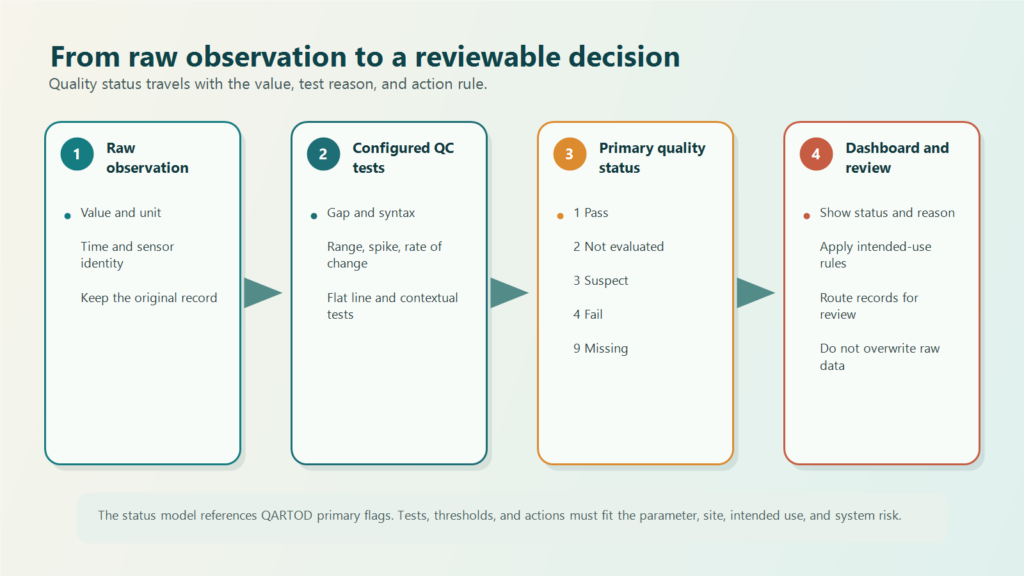
The main dashboard does not need to expose every diagnostic detail at once. A primary flag can provide the operator summary, while a detail panel or audit history records which tests failed and which configuration was active. This keeps the first decision concise without losing technical traceability.
Define an action for every state before go-live
A status without an action rule merely moves ambiguity onto the screen. Before the system is used, define at least four things:
- Which processes, reports, or alarms may consume each status.
- Who receives
SuspectorFailrecords for review. - What evidence is required to change a status, correct derived data, or close a review.
- How the raw record, status changes, user, time, and decision reason remain traceable.
Test those rules with patterns representing normal operation, missing observations, abrupt changes, frozen values, and extreme events that may be real. Quality-status tests can be included in integration and commissioning checks alongside timestamps, communications, local storage, dashboard rendering, and notification behavior.
Logging intervals also affect gap, spike, and rate-of-change tests. The article on choosing data logger intervals separates acquisition, storage, and transmission timing without assuming that one interval fits every system.
Review the data requirement before changing the dashboard
Start with the decision the data must support, not with status colors or a test checklist. Bring the intended use, parameter and site dynamics, reference method, maintenance history, logging interval, alarm logic, acceptable uncertainty, and review responsibilities into the requirements discussion.
Fortuna Argatech works in custom engineering, telemetry, remote monitoring, and dashboard integration. Quality flags should be evaluated as a solution requirement and checked against the approved project architecture and documentation; this article does not claim that one scheme is present in every implementation. To discuss the data path and integration boundaries, contact the Fortuna Argatech team.
Share this article
Share this insight with your team.
Related Articles
Similar topics from the same category.

8 mandatory monitoring criteria for PROPER Blue rating under PermenLH 7/2025: SPARING, AQMS, B3, waste, peatland, mining, and SIMPEL audit.

Compare TDR and FDR soil moisture sensor principles, dielectric calibration limits for tropical peat, and multi-depth telemetry integration via GEOVOS 1000.

Permen LHK 14/2024 ties SPARING telemetry to daily administrative fines. Understand the formula, sensor risks, and edge validation defense.