A Sensor Reading Can Carry More Than One Time
One sensor value may carry measurement, receipt, and display times. Choose the timestamp that should drive history, freshness, latency, and backlog review.

Sensor timestamps do not all answer the same question. One value may carry the time when a condition was measured, when a result was calculated, when the server received the record, and when the dashboard displayed it in a user’s local time.
The distinction matters when delivery is delayed. A record received this morning may describe a measurement from the previous night; if arrival time is treated as occurrence time, history, freshness, delay analysis, and backlog ordering can all tell the wrong story.
One record can carry several times
Consider one water-level record. Its value may be read by a sensor or logger, retained locally, transmitted after connectivity returns, received by a central application, and converted for a user’s time zone. Every time can be valid if the field name and meaning are explicit. Ambiguity begins when all of them are simply called timestamp.
Standards distinguish these events. OGC SensorThings separates phenomenonTime, when an observation happens, from resultTime, when its result becomes available. OPC UA separates a sourceTimestamp applied by the data source from a serverTimestamp associated with the server’s receipt or knowledge of the value.
A project does not have to copy either vocabulary. It does need to preserve the underlying distinction: when the condition existed, when the record arrived, and when a genuinely new result was produced.
Choose sensor timestamps from the decision being made
No single time field is correct for every display and calculation. Start with the operational question, then choose the evidence that answers it.
| Decision | Primary time | Risk of choosing the wrong time |
|---|---|---|
| Build condition history | Measurement or source time | A delayed record appears as a new event |
| Assess the age of a displayed value | Verified measurement time | Newly delivered backlog appears fresh |
| Measure delivery time | Difference between occurrence and receipt | Two clock errors are mistaken for network latency |
| Order records after recovery | Measurement time, supported by an ID or sequence | Old records can be inserted in the wrong order |
| Trace a derived result | Result or processing time together with origin time | Transformation time replaces the event represented |
| Show local time | Display conversion from an explicit UTC relationship | Local rendering changes or duplicates the stored instant |
For online or stale status, a timestamp is still only one piece of evidence. The guide to offline sensor detection explains why data age, heartbeat, and connection state remain separate. The narrower concern here is making sure that data age starts from a time that actually represents the measurement.
Separate timestamp meaning, format, and clock synchronization
Three different problems can look identical on a dashboard.
First, a field name may be ambiguous. created_at could mean that the server created a database record, not that the physical condition was measured. Second, its representation may omit the time zone or relationship to UTC. Third, the clock that produced it may differ too much from another clock for the intended decision.
RFC 3339 defines a date-time representation with an explicit relationship to UTC, such as Z or an offset. Clear formatting does not prove that the clock is correct. Likewise, a synchronized clock does not help if the field never says which event it records.
Do not therefore select NTP, PTP, GNSS, or another method from the technology name alone. Define how closely devices must agree for the project decision, then verify whether the selected source and architecture meet that requirement. This article does not state which synchronization method any Fortuna Argatech device or platform uses.
Write a time contract for the sensor, logger, gateway, and server
A timestamp contract is a short record that lets each team interpret a field in the same way. It is not a mandatory schema from OGC, OPC UA, or Fortuna Argatech.
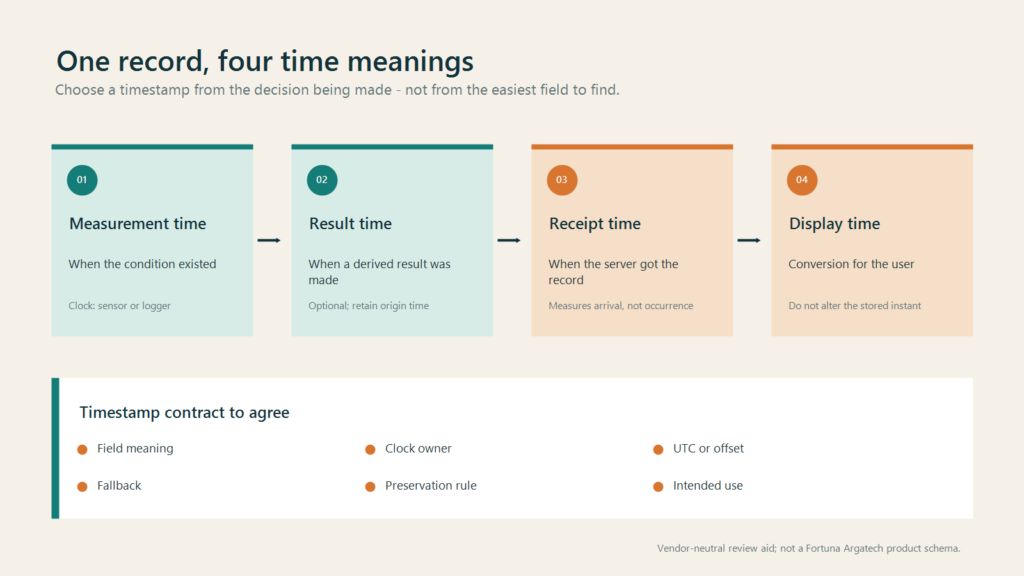
For each time field, record the schema name and UI label, represented event, clock owner, format or time basis, fallback when source time is missing, preservation rule, and intended operational use. Add synchronization state, source identity, or uncertainty only when the device and platform actually expose that evidence.
Fallback behaviour must be visible. A server can receive a record without a measurement time, but replacing the missing field with the current time changes the meaning of the data. A project may reject the record, retain null, apply a quality flag, or store receipt time separately. None of those choices is automatically correct for every system.
The public GEOVOS 1000 data logger page verifies a context involving RS485, cellular communication, local storage, and a monitoring platform. It does not document the timestamp schema, clock source, fallback, or synchronization method. Those details need evidence from the project configuration and data path rather than an assumption from this article.
Preserve measurement time when data arrives late
Store-and-forward makes measurement and receipt time especially easy to confuse. When a network path recovers, many records may reach the server close together. History should still position each value at the time of the condition it represents, while receipt time remains available for delivery-path and delay analysis.
The guide to data logger storage covers retention capacity and backlog-recovery evidence. The time contract needs a narrower check: whether measurement time remains unchanged before and after replay, whether receipt time is stored separately, and whether a stable ID or sequence is available to investigate order and duplicates.
Well-formatted timestamps do not guarantee that records are complete, unique, correctly ordered, or valid. Data quality, delivery, deduplication, and record identity remain separate controls.
Test clock loss, reboot, network recovery, and time zones
Use one test channel and one recognisable value. Capture the fields available at the sensor or logger, gateway, API or database, dashboard, and export. Run only scenarios that are safe and approved for the project.
- Compare a normal record at every layer, including format, offset, clock owner, and stable ID where available.
- Test a missing or invalid source time. Confirm that the system rejects, flags, estimates, or substitutes it according to the contract instead of silently changing meaning.
- Perform an approved reboot and check that time recovers before new measurements are treated as current.
- Interrupt the network under an approved procedure, then compare measurement time, receipt time, order, gaps, and duplicates after backlog delivery.
- Open the same records through an API or export and on desktop and mobile dashboards to expose inconsistent time-zone conversion.
A latency calculation becomes credible only when the relationship between the two clocks is known well enough for that purpose. Otherwise, a time difference can combine network delay, processing queues, and device-clock disagreement.
Bring one record to the integration review
One sample record is often more useful than a general discussion about clocks. Bring the payload or export, field names, example values, zone or offset, known clock owner, offline behaviour, and views from the relevant layers. Mark anything not supported by evidence as UNVERIFIED.
Fortuna Argatech works with data loggers, telemetry, remote monitoring, and dashboard integration. To review a timestamp contract against the devices, network, database, and operational decisions used in your project, contact the Fortuna Argatech team. Technical review remains necessary before time rules are used for alarms, reporting, or other high-consequence decisions.
Share this article
Share this insight with your team.
Related Articles
Similar topics from the same category.

8 mandatory monitoring criteria for PROPER Blue rating under PermenLH 7/2025: SPARING, AQMS, B3, waste, peatland, mining, and SIMPEL audit.

Compare TDR and FDR soil moisture sensor principles, dielectric calibration limits for tropical peat, and multi-depth telemetry integration via GEOVOS 1000.

Permen LHK 14/2024 ties SPARING telemetry to daily administrative fines. Understand the formula, sensor risks, and edge validation defense.